01 / SAVE YOUR FIRST RECIPE
How to save a recipe from Instagram
Start with one public Reel or recipe post. You can send its link to Hireci through the iOS share sheet or paste the link into the app. The original post needs to be available, and import results depend on the recipe information it contains.
Open the recipe you want to keep
Open the Instagram Reel or post itself. Look for ingredient amounts and directions in the caption or video, so you have the original details ready to compare with the imported recipe.
Share the post to Hireci
In a public Reel, tap the paper-plane share icon, then Share to… to open the iOS share sheet. Select HIRECI in the app row to start importing. If it is missing, follow the first-time setup below. Instagram’s sharing options can vary by version.
Review the ingredients and directions
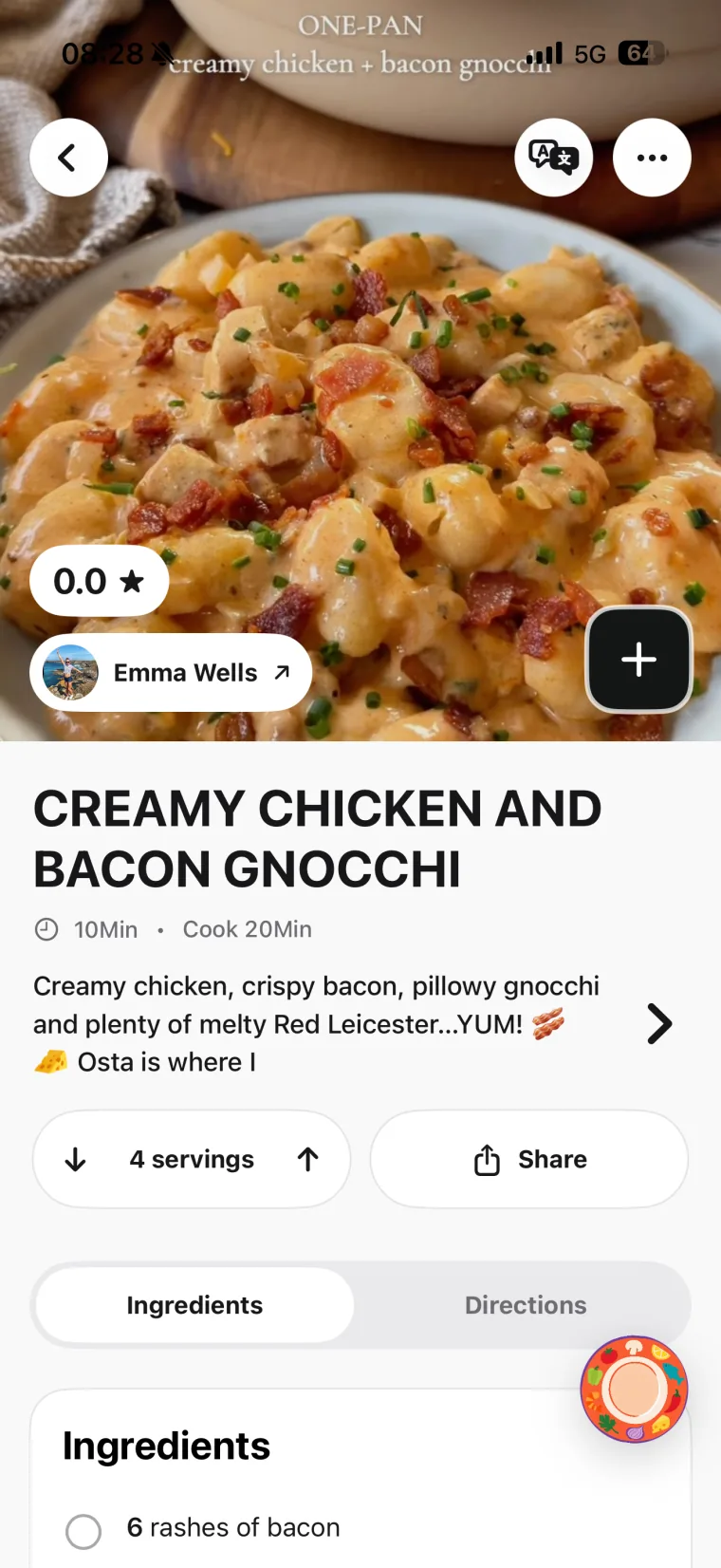
Open the imported recipe in Hireci. Check quantities, units, serving count and cooking steps against the original post. Edit missing or unclear details before relying on the recipe in the kitchen. For a closer look at this step, follow the Instagram Recipe Converter walkthrough.
Give the recipe a place in your week
Organize it in your recipe library, add it to a meal plan or send its ingredients to your grocery list. When you want it again, search by title, ingredient or creator.
Prefer to copy and paste?
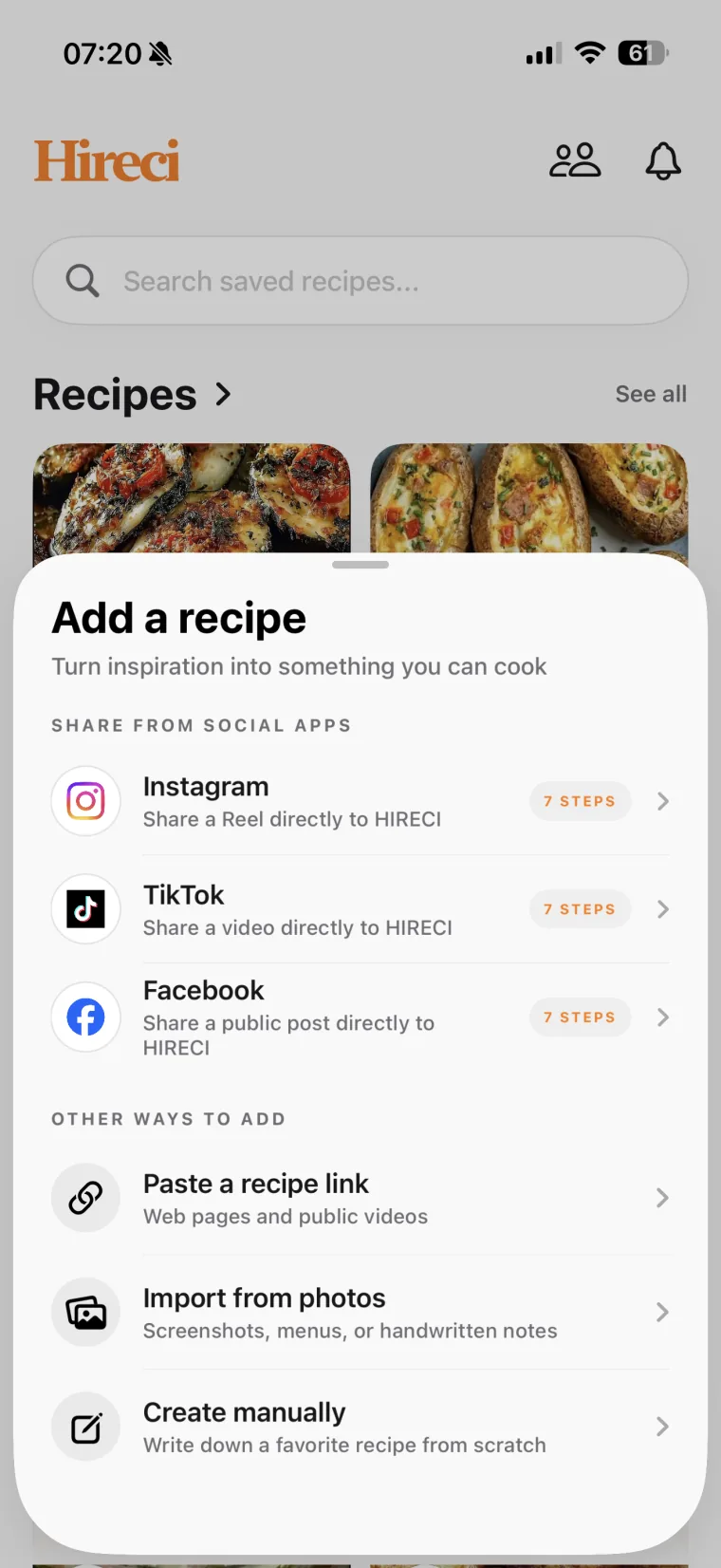
Copy the individual Instagram post or Reel link. Open Hireci’s add-recipe menu and choose Paste a recipe link. Tap Paste, then Analyze recipe. This is also a useful alternative when Hireci is missing from the share sheet.
First time using the extension? Install and open Hireci, then swipe to the end of the iOS app-sharing row. Tap More → Edit, tap + next to HIRECI, then Done. Return to the sharing row and select HIRECI. You only need to add it to Favorites once.
02 / CHOOSE WHAT YOU WANT TO KEEP
An Instagram bookmark keeps the post. A cookbook helps with dinner.
Instagram’s Saved feature is useful for collecting inspiration. A recipe organizer is useful when you want to work with the ingredients and instructions. You can use both: keep the Reel for the creator’s technique, and keep an editable recipe in Hireci for cooking.
Two ways to keep a recipe you find on Instagram
| What you need | Instagram Saved | A recipe in Hireci |
|---|
| Revisit the creator’s post | Return to the original Reel or post. | Return through the source link when available. |
|---|
| Adjust recipe details | Read the recipe as the creator published it. | Edit ingredients, quantities and directions. |
|---|
| Choose what to cook | Browse your saved inspiration. | Search your recipe library and add a dish to your meal plan. |
|---|
| Shop for the dish | Refer to the post as you make a list. | Add recipe ingredients to your grocery list. |
|---|
Source links still depend on the original post remaining available. Available creator information stays connected to the recipe; imported details should always be reviewed.
03 / MAKE SOMETHING WITH IT
Turn a saved Reel into a meal you actually cook
Imagine finding a pasta Reel on your commute. Import it while it is in front of you, check whether the quantities serve two or four, and name it so you will recognize it later. A folder such as “Weeknight dinners” gives it a useful home.
When you plan dinner, choose the recipe from your library and adjust the servings. Add its ingredients to your shopping list, then review what you already have before shopping. The original Reel can still help with a folding technique or a visual cue while the written recipe keeps the next step easy to find.
A quick check before you cook
- Do the quantities match the number of servings?
- Are the ingredient units clear—for example, teaspoons versus tablespoons?
- Did the import include oven temperature, timing and any preparation steps?
- Are there details in the caption that you still need to add?
Explore the Hireci recipe organizer and meal-planning features if you also want to bring website recipes and photos into the same cookbook. For recipes you find on TikTok, follow the TikTok recipe-saving guide.
04 / WHEN AN IMPORT NEEDS A HAND
Why won’t my Instagram recipe import?
Not every post contains a complete recipe, and not every link is accessible. Check the source first, then choose the simplest way to bring the recipe into your library.
The post is private, deleted or unavailable
Check that you have a public link to an individual Reel or post. Content that requires access to a private account may not import. If you have a readable recipe screenshot or photo, use Hireci’s photo import instead, or enter the recipe manually.
Hireci is missing from the sharing options
Open Hireci once after installation, then check More in the iOS share sheet. You can also copy the Instagram link and use Paste a recipe link in Hireci’s add-recipe menu.
The recipe is incomplete
Compare the import with the original caption and video. A post with only a dish name or a few ingredients may not provide enough information for a complete recipe. Add the missing amounts or instructions manually rather than guessing.
A public recipe still will not import
Check your internet connection, update Hireci and try the individual post link again. If it still fails, contact Hireci support with the public link and the steps you tried.
05 / COMMON QUESTIONS
Using an Instagram recipe saver
What is an app to save recipes from Instagram?
A recipe-saving app turns supported posts into recipe details you can keep and use. Hireci lets you import a public Instagram recipe, review and edit its ingredients and directions, and organize it alongside your other recipes on iPhone or iPad.
Can I save recipes from Instagram Reels?
Yes, Hireci supports recipe imports from supported public Instagram Reels and posts. Share the link to Hireci or paste it into the app, then review the result. Access restrictions and the amount of recipe information in the post affect what can be imported.
Is Hireci a free Instagram recipe saver?
Hireci is free to download from the App Store. Some features require an active Hireci+ subscription, including unlimited smart imports, meal-planning and grocery-list tools, and nutrition analysis. Check the app for current subscription options before choosing a plan.
Will my saved recipe include the original creator?
Hireci keeps available source and creator information with the recipe, so you can return to the original post. The details available depend on the source; an imported recipe may not include every piece of creator information.
Can I save an Instagram recipe from a screenshot?
Yes. Use the photo-import option for a readable screenshot of the recipe text. Review the extracted ingredients, amounts and steps afterward. Include all the relevant recipe information; a photo of the finished dish alone does not contain the creator’s full instructions.
Can I make a grocery list from an Instagram recipe?
Yes. After importing and reviewing the recipe, add its ingredients to your Hireci grocery list. Check quantities and remove anything you already have. Meal-planning and grocery-list tools are among the features that require Hireci+.
Hireci is an independent app and is not affiliated with Instagram or Meta.