
01 / FROM A LINK TO A RECIPE
How to use a TikTok recipe converter in Hireci
Start with one cooking video that contains a recipe you want to make. A TikTok recipe converter can organize the available information into ingredients and directions. You still need the original post to check quantities, preparation details and anything the video skips.
Copy the original TikTok video link
Open the individual video, tap Share and choose Copy link. Check that you have the cooking post itself. A profile, sound, search or collection page does not identify one recipe. For a duet or reaction, find the original recipe video when possible. Comparing every way to keep a TikTok recipe? See how to save TikTok recipes.
Paste the link into Hireci
In Hireci’s add-recipe menu, choose Paste a recipe link, then tap Paste. Keep only the complete URL in the field. If TikTok copied extra words along with the link, remove those words before you continue.
Convert the TikTok into a recipe
Tap Analyze recipe. When the import finishes, open the recipe and check what came through: its title, ingredients, directions and available source information. A missing amount is something to verify against the creator’s instructions.
Review, edit and save the result
Return to the video and compare it with the recipe. In Hireci, open the … menu, choose Edit recipe, correct the ingredients or steps, then tap Save. The worked example below shows how to keep important details in the right fields.
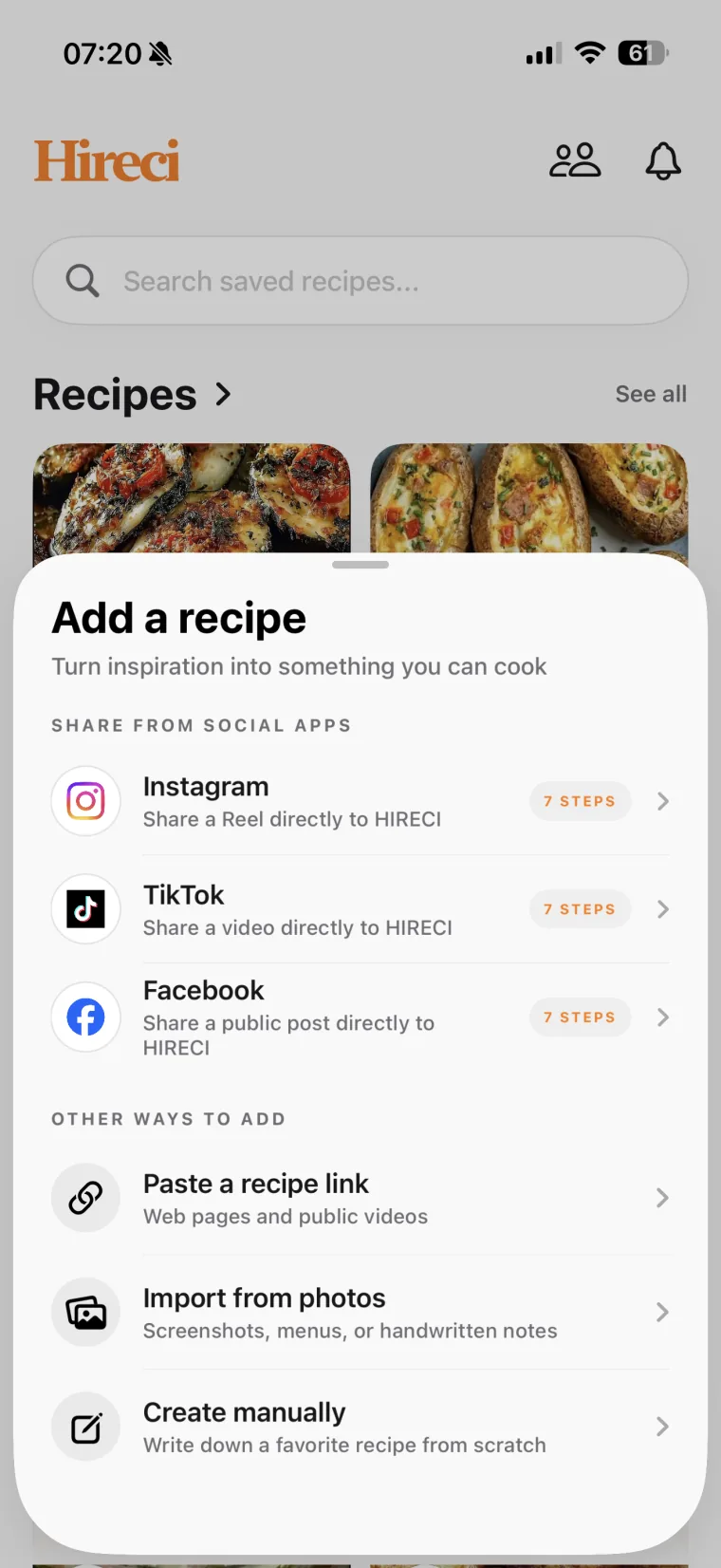 Choose Paste a recipe link
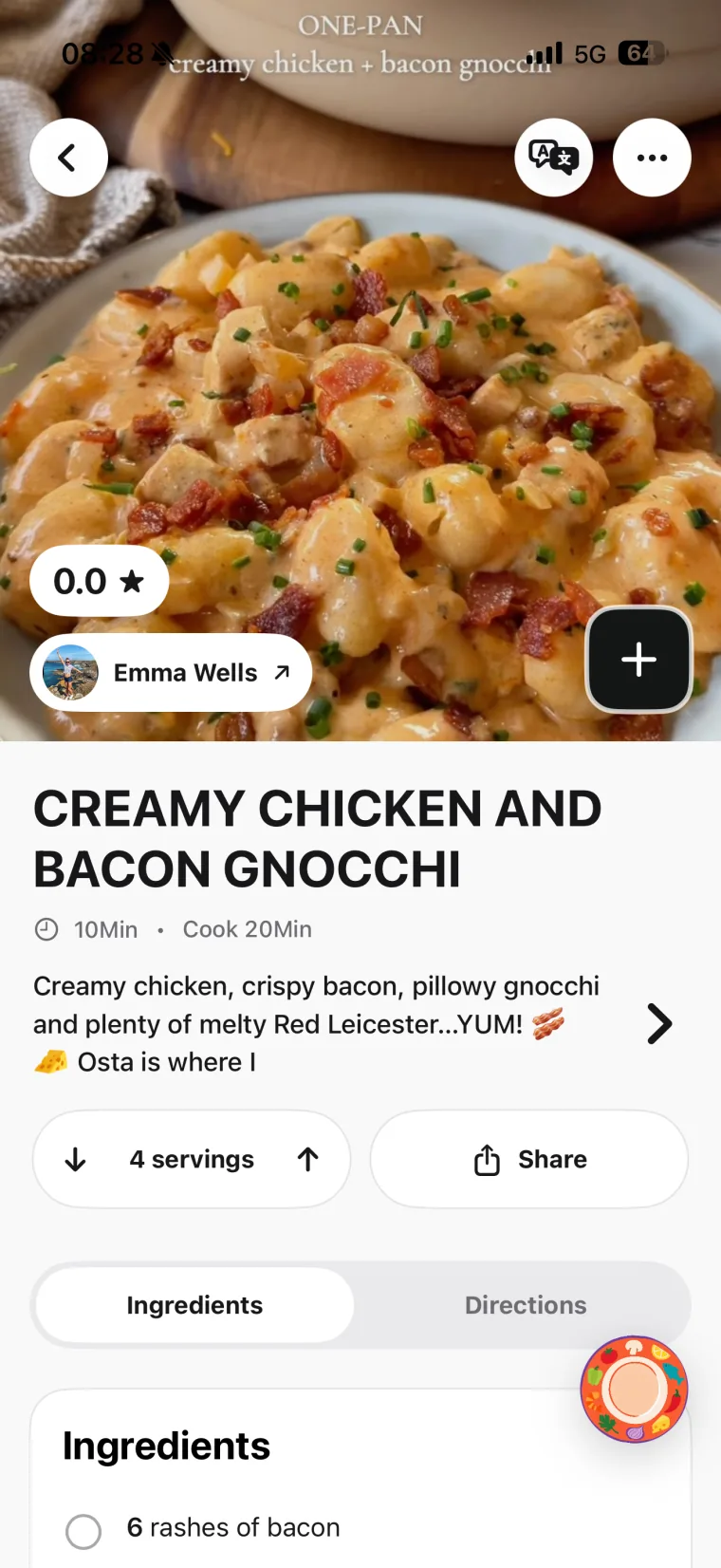 Open and review the recipe
Want to share directly from TikTok?
Tap TikTok’s Share arrow, choose More in its sharing panel, then select HIRECI in the iOS app row. If it is missing, the TikTok sharing setup guide explains how to add it. The TikTok entry inside Hireci’s add-recipe menu opens a tutorial; use Paste a recipe link for the copy-and-paste method.
02 / A WORKED EXAMPLE
Turn a TikTok cooking video into a written recipe
A short clip may put the quantities in its caption, show a preparation detail on screen and explain the order aloud. Gather those details before deciding whether your converted recipe is complete. Do not assume every source of information was imported automatically.
Original teaching example, not a real TikTok post or an actual import. It illustrates how to organize information you have checked.
DETAILS IN THE CLIP
Lemon butter pasta
- Caption: 200 g dry pasta, 1 tbsp butter, 2 tbsp lemon juice.
- On-screen instruction: Cook the pasta until al dente; reserve some cooking water before draining.
- Spoken instruction: Toss the pasta with the butter and lemon juice over low heat. Add a little reserved water as needed to loosen the sauce.
ORGANIZED RECIPE
Lemon butter pasta
Ingredients
- 200 g pasta — dry weight
- 1 tbsp butter
- 2 tbsp lemon juice
- Reserved pasta water, as needed
Directions
- Cook the pasta until al dente. Reserve some cooking water, then drain.
- Toss the pasta with the butter and lemon juice over low heat.
- Add reserved water as needed to loosen the sauce.
Not specified: The serving count, exact cooking time and amount of reserved water. The recipe keeps those gaps visible.
Keep “dry weight” with the ingredient
In Edit recipe, enter 200 g in Amount, Pasta in Ingredient and Dry weight in Note (optional). This preserves what the quantity means. Putting “200 g cooked pasta” instead would change the recipe.
Use Add ingredient or Add step for a verified detail that is missing. In this example, reserving water belongs before draining. Tap Save after editing, then reopen the recipe to check the order.
03 / READ BETWEEN THE CUTS
Check the details a TikTok recipe conversion can miss
A video can jump from preparation to a finished dish without showing everything in between. Read the imported directions in order while replaying the original demonstration. Look for conditions that change what you buy or how you prepare it.
| Detail | What to check | What to keep in your recipe |
|---|---|---|
| Ingredient condition | Dry or cooked pasta; drained or undrained beans; melted or cold butter. | The stated quantity plus its preparation condition in the ingredient note. |
| A quick on-screen amount | The whole unit: tsp and tbsp are different, as are g and ml. | The amount and unit that the creator actually gives. |
| A cut or sped-up sequence | Whether mixing, resting, draining or cooking happens between shots. | The stated preparation sequence and timing. Video length is not cooking time. |
| Two versions of a dish | Whether a duet, stitch or follow-up changes the original ingredients. | One coherent version, with your chosen substitutions clearly noted. |
| A creator’s correction | Whether a caption or comment updates a quantity or instruction. | The correction after you verify it. Do not assume comments are included in the import. |
If the creator never provides a quantity, yield or temperature, check for their written recipe or ask for clarification before relying on that detail. Avoid turning an uncertain guess into an apparently exact instruction.
04 / GET THE RIGHT SOURCE
Fix TikTok links and incomplete recipe conversions
Your link starts with vm.tiktok.com or vt.tiktok.com
These are short-link forms. Try the complete copied link first. If it fails, open it to check which video it reaches, then copy a fresh link from the original post. A full video address commonly contains /@creator/video/…. Do not substitute a profile URL or manually invent the missing part of a link.
The recipe only exists in a caption or comment
Compare the result with the text yourself. You can add verified missing details through Edit recipe. If the creator provides a full written version on a website, use that individual recipe page as the source and follow the website recipe import guide.
The video is private, deleted or restricted
A post that opens in your TikTok account may not be publicly accessible to an importer. Look for an available written version from the creator. If you already have a readable image of recipe text, Import from photos is a separate option; review the extracted recipe before saving it. A finished-dish photo alone does not contain the creator’s full method.
You still cannot convert an available public post
Try one fresh video link and confirm that it points to the intended recipe. If the import still fails, contact Hireci support with the post URL and what happened. Include the error message if one appeared.
05 / QUESTIONS BEFORE YOU CONVERT
TikTok Recipe Converter FAQ
Does this page convert TikTok links in the browser?
This page is a tutorial for Hireci on iPhone and iPad. The conversion happens inside the app: choose Paste a recipe link, paste the public TikTok video URL and tap Analyze recipe. The illustration above shows the idea of the workflow.
Can I convert a TikTok recipe without downloading the video?
Yes. The link and sharing methods use the post URL, so you do not need to save a video file first. The post must be accessible, and the available recipe information determines what can be imported.
Does a TikTok recipe converter transcribe everything said in a video?
A recipe import aims to organize cooking information into ingredients and directions. It is not a guarantee of a full transcript, every caption line or every comment. Compare the result with the source, especially when an important detail is only spoken or shown briefly.
Can Hireci convert all the recipes in my TikTok Favorites?
This tutorial covers one public video link at a time. Copy the individual cooking post you want to import. A Favorites or collection link is not a substitute for that post URL.
Can I correct the converted TikTok recipe?
Yes. Open the recipe’s … menu and choose Edit recipe. Update the ingredient amounts, names, notes and directions, then Save. Keep your own substitutions distinct from the creator’s original instructions.
Can I use the same workflow for Instagram recipes?
Hireci also supports importing recipes from public Instagram posts. See the Instagram Recipe Converter tutorial for the platform’s link and sharing steps, a separate example and a review checklist. For Facebook Reels, see the Facebook Reels Converter tutorial.
Hireci is an independent app and is not affiliated with TikTok.