
01 / WHAT IT DOES
What a recipe converter does
A recipe converter reads a recipe where it lives — in a video caption, a description box, a screenshot — and reorganizes it into the two things a cook needs: ingredients and directions. Bookmarks and screenshots keep the original post intact but leave you hunting through your camera roll later. A converted recipe is searchable, editable and ready for a grocery list.
Bring the source to Hireci
Copy the public link of a cooking post or video, or pick a screenshot that shows the full recipe text. In Hireci’s add-recipe menu, choose Paste a recipe link for URLs or Import from photos for images. One source per recipe keeps the result clean.
Convert it into a recipe
Tap Analyze recipe. Hireci organizes what it finds into a title, ingredients, directions and source information. The conversion is a starting point, not a finished recipe — the next two steps are what make it reliable.
Check it against the original
Open the original post next to the converted recipe. Compare every amount and step in order. Videos skip things, captions get edited, and screenshots get cropped — the review checklist below shows what to look for.
Edit, save and cook from it
Open the … menu, choose Edit recipe, fix anything the conversion missed, then tap Save. Add your own notes and substitutions so the recipe reflects how you actually cook.
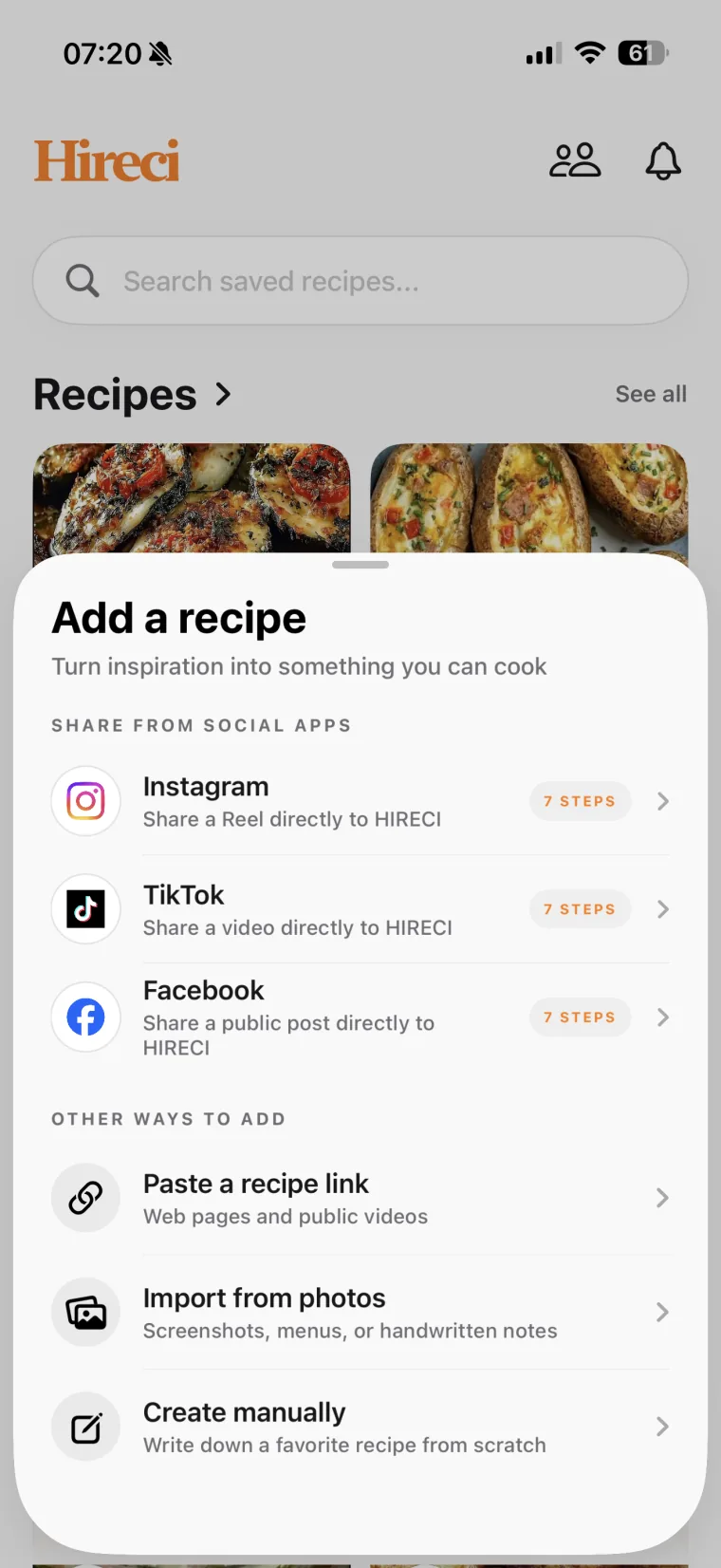 Choose a link or a photo
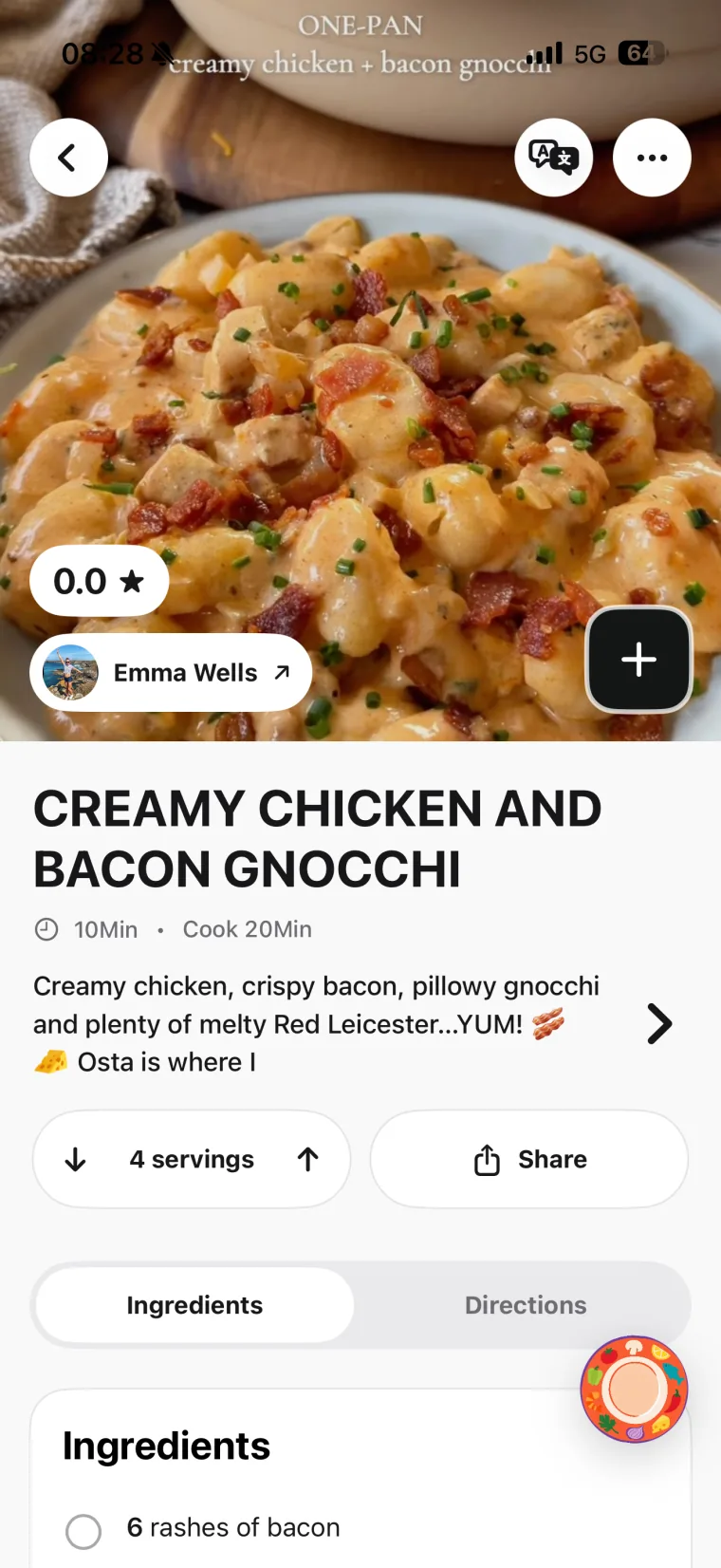 Open and review the recipe
Start with the source you use most
If most of your recipes come from one place, learn that workflow first: the TikTok recipe converter tutorial, the Instagram recipe converter tutorial, or the screenshot converter guide. Each one covers the same four steps with source-specific checks.
02 / SIX SOURCES, ONE RECIPE BOX
Six ways to bring a recipe into Hireci
Every source below has its own step-by-step tutorial with a worked example and a review checklist. Pick the one that matches where you found the recipe.
Instagram Recipe Converter
Turn a public Reel or post into editable ingredients and steps. Covers which link to copy and what to check in fast-cut videos.
TikTok Recipe Converter
Convert a public cooking video link by link. Includes the sharing setup and fixes for duets, stitches and caption-only recipes.
Facebook Reels Converter
Bring a public Reel’s recipe into Hireci. Shows how to find the original post when a Reel has been reshared.
Pinterest Recipe Converter
Turn a Pin into a recipe by importing the original recipe website behind it, then reviewing the result.
Screenshot Recipe Converter
Import a photo of recipe text — a screenshot, a cookbook page or a printed card — and review the extracted result.
YouTube Recipe Converter
Convert a public video or Short into a recipe, using the description box and timestamps to fill the gaps.
03 / TRUST, THEN COOK
Check every conversion before you cook
A conversion organizes what it could find; it cannot know what the source left out. Work through this checklist with the original open beside the recipe.
| Detail | What to check | What to keep in your recipe |
|---|---|---|
| Ingredient condition | Dry or cooked, drained or undrained, melted or softened. | The stated quantity plus its condition in the ingredient note. |
| Amounts and units | The whole unit: tsp and tbsp are different, as are g and ml. Fractions in screenshots are easy to misread. | The amount and unit the source actually states. |
| Order of steps | Whether anything happens between cuts: resting, draining, preheating. | Steps in cooking order, not video order. |
| The source itself | Whether you used the original post, not a reshare, duet or reaction. | A recipe tied to the original source. |
| Visible gaps | Serving count, times and temperatures the source never gives. | Gaps left visible, not filled with guesses. |
If a detail is missing from the source, leave it missing in the recipe until you can verify it. A blank field is honest; a guessed number looks exact and cooks wrong.
04 / WHEN IT DOESN’T WORK
Fix common recipe conversion problems
The link imports nothing or the wrong post
Use the individual post or video URL — not a profile, search, hashtag or collection page. Copy it fresh from the original post with Share → Copy link, and make sure no extra words came along with it.
Key details are missing from the result
Check the caption, description box and comments of the original; creators often put amounts there. Add what you verify through Edit recipe. If the creator published a written version on a website, import that page instead — see the website recipe import guide.
The post is private, deleted or restricted
Only publicly accessible content can be converted. Look for a written version from the same creator. A photo of the finished dish contains no method to extract.
The text is in another language or hard to read
For screenshots, a straight, well-lit photo of printed text converts best. Handwriting and stylized fonts are often misread — correct them by hand in Edit recipe.
05 / COMMON QUESTIONS
Recipe Converter FAQ
What is a recipe converter?
A recipe converter turns a recipe found outside a cookbook — in a social post, a video, a screenshot or a webpage — into an organized, editable recipe with ingredients and directions. Hireci is a recipe converter for iPhone and iPad: it imports the source, structures what it finds, and lets you review and edit the result before you cook from it.
Is the recipe converter free to use?
Hireci is available on the App Store for iPhone and iPad. Check the App Store listing for current pricing and what is included — the tutorials on this site cover the conversion workflow itself, which works the same way in the app.
Which sources can I convert with Hireci?
Public Instagram posts and Reels, TikTok videos, Facebook Reels, Pinterest Pins (via the original recipe site), YouTube videos and Shorts, recipe websites, and photos or screenshots of recipe text. Each source has its own tutorial linked in the Six ways section above.
Do I need to download the video before converting?
No. The link method uses the post URL, so nothing is downloaded. In Hireci, choose Paste a recipe link, paste the public video URL and tap Analyze recipe. For screenshots, use Import from photos on the image you already have.
Can I convert a private post?
No. The post must be publicly accessible for an import to work. A private, deleted or restricted post cannot be converted — look for a public or written version from the same creator instead.
Can I edit a recipe after converting it?
Yes. Open the recipe, tap the … menu and choose Edit recipe. You can change amounts, ingredient names, notes and steps, add missing details and record your own substitutions, then Save.
How is converting different from saving or bookmarking a post?
A bookmark saves the post; a conversion saves the recipe. The converted recipe is searchable in your own collection, editable, and ready for grocery lists and meal planning — you do not have to rewatch a video or dig through screenshots to find the amount of butter again.
Can I use Hireci on devices other than iPhone?
Hireci is built for iPhone and iPad. Your converted recipes live in the app on those devices.
Hireci is an independent app and is not affiliated with Instagram, TikTok, Facebook, Pinterest or YouTube.