The link won’t import
Make sure you copied the individual recipe or post link, not a profile or homepage. Check your connection and try again. If it still fails, contact Hireci support with the link and what you tried.
EVERY RECIPE. ONE COOKBOOK.
Your recipes are scattered across TikTok saves, Instagram collections, Pinterest boards, screenshots and bookmarks. Hireci brings them into one searchable cookbook you can actually cook from.
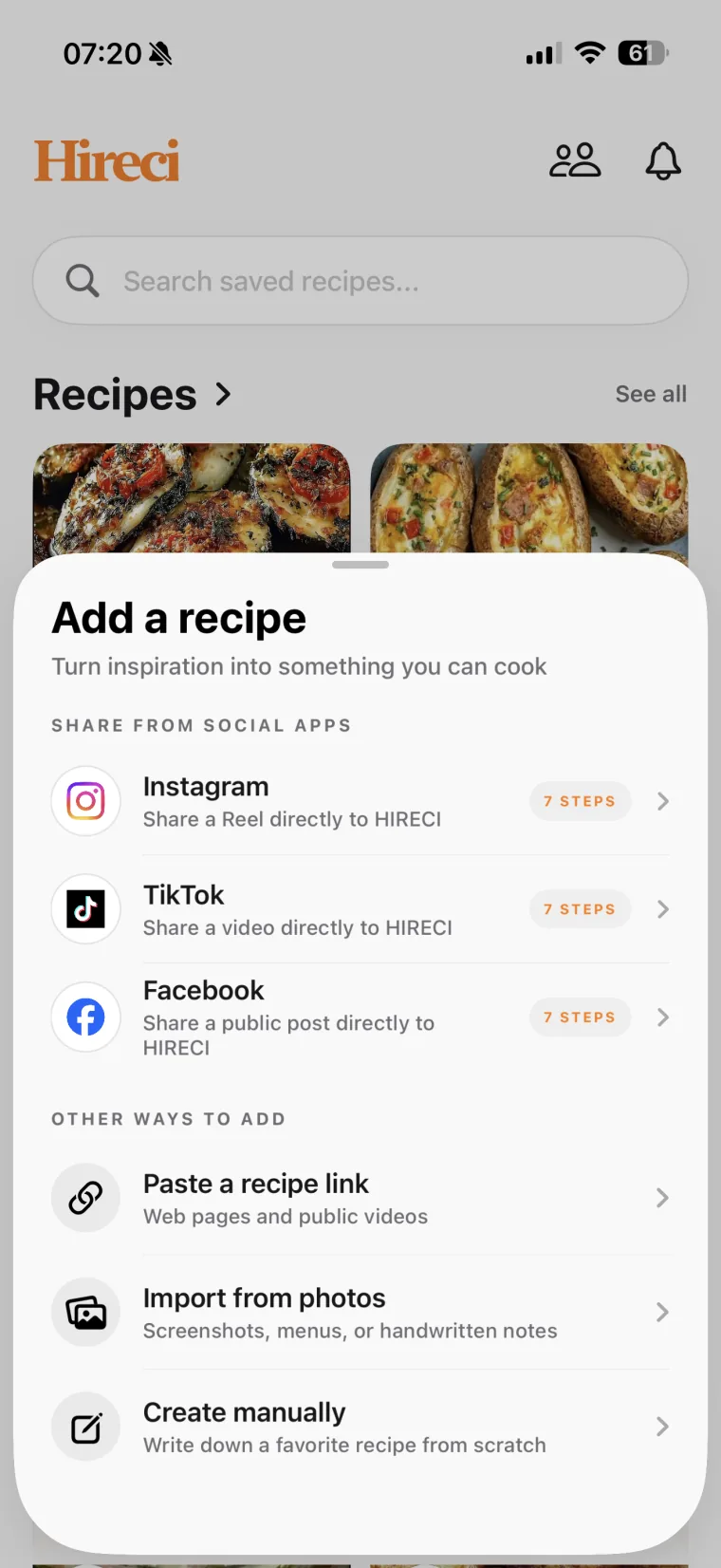
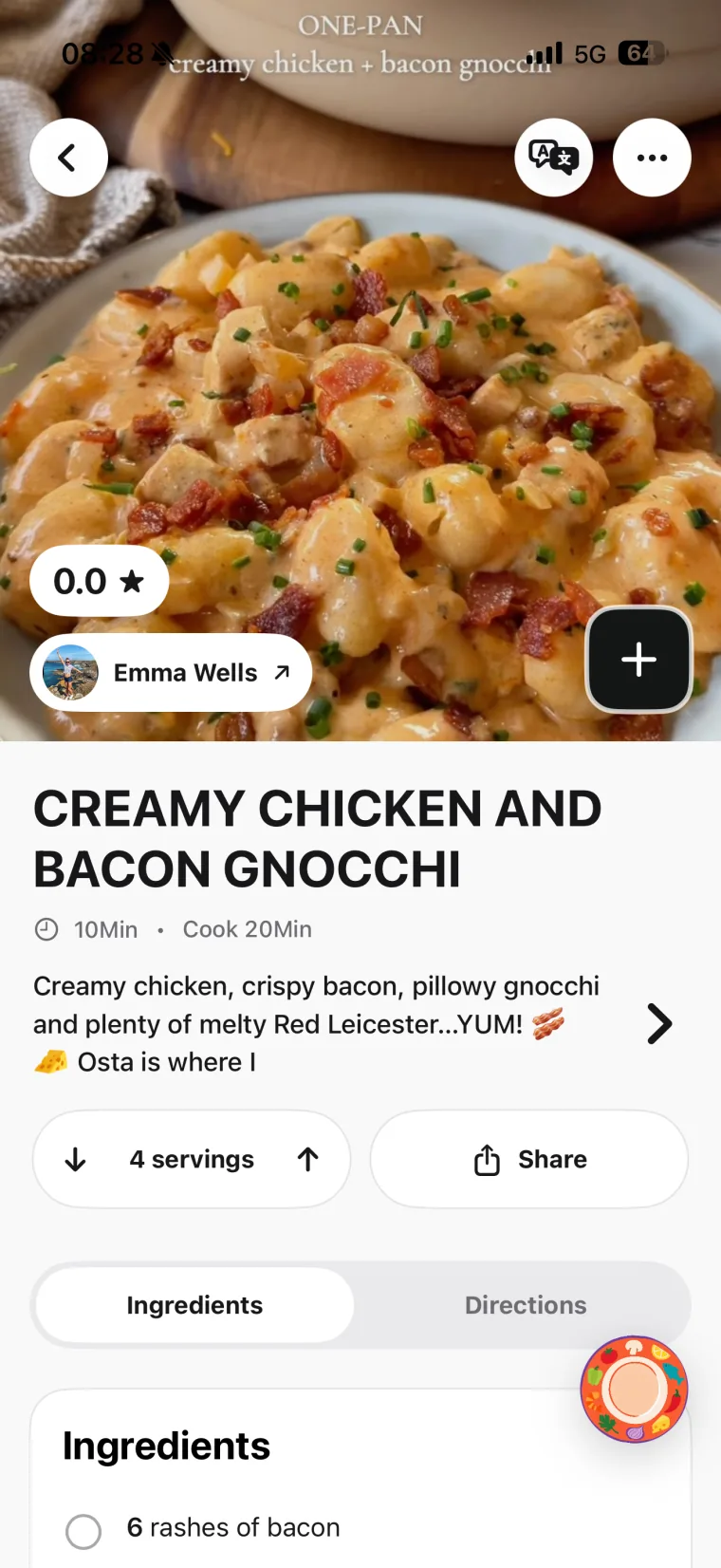
Collect from anywhereVideos, screenshots, pins and links become recipes.
Find anything fastSearch your whole cookbook by ingredient or craving.
Plan and shopTurn recipes into a meal plan and grocery list.
01 / COLLECT FROM ANYWHERE
A recipe organizer is only useful if getting recipes into it is effortless. Hireci accepts a recipe however you found it — no retyping, no copy-paste marathons.
Copy the video, post or pin link, open Hireci and choose Add a recipe → Paste a recipe link. Tap Paste, then Analyze recipe. Hireci builds an editable recipe from what it can read. For the platform-by-platform details, see the TikTok, Instagram, YouTube and Pinterest converter guides.
Screenshots of recipes from anywhere — group chats, articles, cookbooks — import directly from your camera roll. Hireci reads the ingredients and steps out of the image. See the screenshot recipe converter for tips on getting a clean import.
Paste any recipe website link the same way, or enter a family recipe manually. Everything lands in the same cookbook, in the same format, searchable the same way.
Open each imported recipe and check quantities, units and servings against the original. An imported recipe you reviewed is trustworthy; one you never looked at is just a nicer-looking guess.
Saved videos and pins are collections of links, not recipes. You cannot search them by ingredient, you cannot adjust servings, and they vanish if the creator deletes the post. An organizer turns each save into a recipe you own. Our guide to finding your saved recipes on your phone shows exactly where everything hides today.
02 / MAKE IT FINDABLE
Collecting is half the job. The other half is making sure you can find the recipe on a busy Tuesday night. Three habits do most of the work.
| Habit | What to do | What it solves |
|---|---|---|
| Name it clearly | “15-minute garlic butter noodles” instead of “TikTok pasta”. | You recognize it months later. |
| Keep a few collections | Weeknight dinners, Weekend projects, Baking, For guests. | Every recipe has a home the day it arrives. |
| File it immediately | Name and collection at import time, not “later”. | No mystery pile to sort through. |
Once recipes are named and filed, search does the rest: one word — chicken, one-pot, noodles — and you get a usable answer. For a deeper system, read how to organize saved recipes.
03 / MAKE SOMETHING WITH IT
An organized cookbook pays off at three moments: planning, shopping and cooking. Pick recipes for the week from your library and adjust servings to the people you are feeding. Add the ingredients to your grocery list, then check what you already have before you shop. At the stove, cook from steps you can read at a glance — no pausing a video, no pinching a screenshot.
See how to turn saved recipes into a week’s meal plan, or browse what a recipe converter does for the full picture of Hireci’s import tools.
04 / WHEN AN IMPORT NEEDS A HAND
Most import problems come down to the source, not the app. Check the source first, then pick the simplest path into your cookbook.
Make sure you copied the individual recipe or post link, not a profile or homepage. Check your connection and try again. If it still fails, contact Hireci support with the link and what you tried.
Use a clear screenshot of the recipe card or text, with the full ingredient list and steps in the frame. Avoid heavy overlays, watermarks or cropped edges that hide content.
Compare the import against the original. Add any missing amounts, units, temperatures or steps manually rather than guessing — especially for baking.
Search by a single ingredient or dish word first. If you imported it without renaming, check your most recent imports. Rename it clearly now so it doesn’t hide again.
05 / COMMON QUESTIONS
A recipe organizer app keeps all your recipes in one searchable place instead of scattered across social apps, screenshots and bookmarks. Hireci imports recipes from TikTok, Instagram, YouTube, Pinterest, screenshots and websites, turning each into an editable recipe with ingredients, steps and servings that you can search, plan and cook from.
Boards and saved videos collect links and clips; they cannot be searched by ingredient and they disappear if the original post is deleted. Hireci converts each save into a real recipe — ingredients, amounts, steps — stored in your own cookbook, so you can find it by searching one word and cook from it even if the original video is gone.
Yes. Copy a video or post link and paste it into Hireci to import the recipe, or import a screenshot or photo and Hireci reads the recipe from the image. Pinterest pins and recipe website links import the same way.
Hireci is free to download from the App Store. Some features require an active Hireci+ subscription, including unlimited smart imports, meal-planning and grocery-list tools, and nutrition analysis. Check the app for current subscription options before choosing a plan.
Yes. Add organized recipes to a weekly meal plan, adjust servings, and build a grocery list from the ingredients. Meal-planning and grocery-list tools are among the features that require Hireci+.
Yes. Hireci runs on both iPhone and iPad, so your cookbook is available whether you are saving recipes on the couch or cooking with the iPad propped on the counter.
ONE COOKBOOK, EVERY RECIPE
Bring one recipe in — a link, a screenshot, a pin — and see what a real cookbook feels like. Then bring the rest.